
Why Your Workspace Setup Matters More Than You Think
Have you ever opened your Power BI dashboard only to find that your data isn’t as up to date as you expected? That frustrating moment often comes down to one simple reason — refresh limits.
Whether you’re using Power BI Pro, Premium Per User (PPU), or a Microsoft Fabric F2 capacity, each setup comes with its own refresh rules. Understanding those limits can save you hours of confusion and help your business make faster, more reliable data-driven decisions.
Why Refresh Matters in Power BI — and When It Actually Applies
- A refresh in Power BI simply means pulling in the latest data so your dashboards show up-to-date information from sources like SQL databases, APIs, or Excel files.
- You can refresh data manually, on a schedule, or through APIs and Fabric pipelines, but refresh is only important in one specific scenario.
- Refresh applies exclusively to Import mode, where Power BI stores a snapshot of your data inside the dataset — and that snapshot becomes stale unless it’s refreshed.
- Because of this, Microsoft enforces refresh limits based on your license and workspace capacity, and these limits apply only to Import-mode datasets.
- Direct Query mode never needs refresh because it retrieves live data directly from the source.
- Composite mode mixes both, and only the imported portion requires refresh.
In short: refresh rates matter because only imported data can become outdated — and that’s exactly why Power BI sets refresh restrictions.
Power BI Pro — The 8-Refresh Reality
Power BI Pro workspaces operate on shared capacity, which means your compute resources are shared with other users. This setup is ideal for smaller teams or reports that don’t require frequent data updates — but it does come with limitations.
Key Highlights
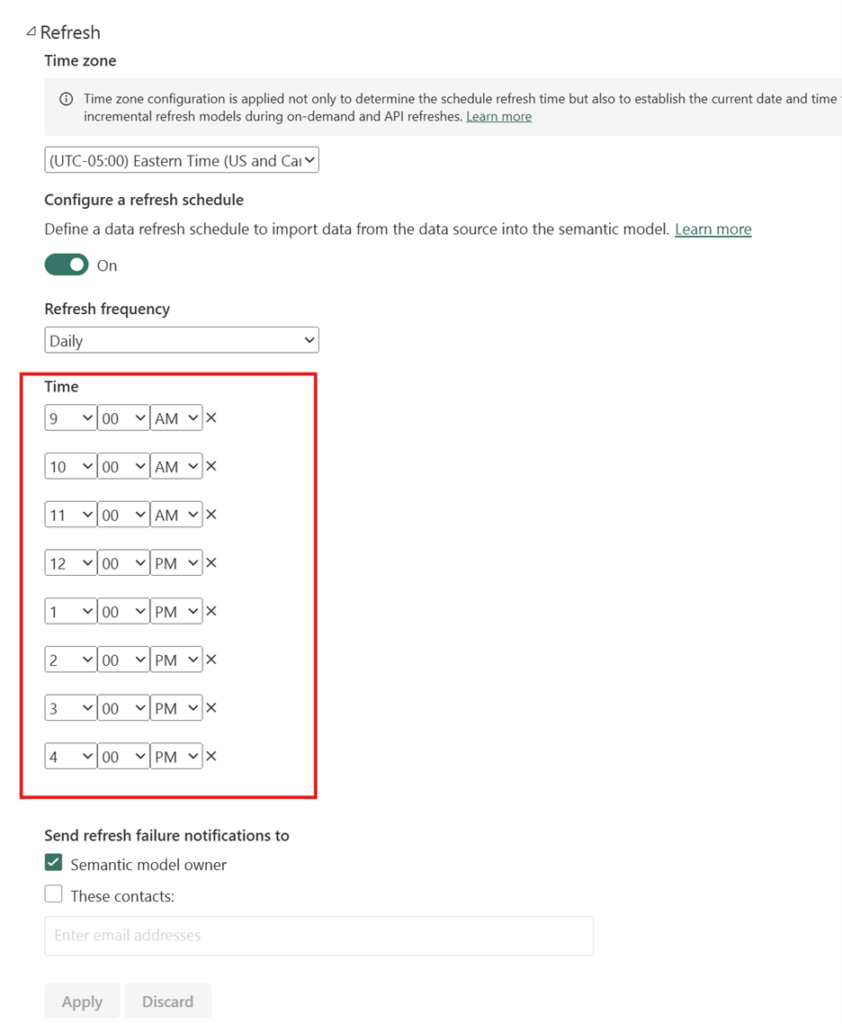
- Maximum scheduled refreshes (Power BI Service): 8 per day
- Model size limit: 1 GB per dataset
- Capacity type: Shared (no dedicated compute resources)
- Manual refreshes: Unlimited via Power BI Desktop
Real-World Example
Let’s say your sales data updates every 30 minutes. Even though the data source changes frequently, your Power BI Pro workspace can only refresh eight times a day — not every half hour.
That’s why Power BI Pro is best suited for teams that can work with daily or less frequent data updates, rather than those needing near real-time insights.
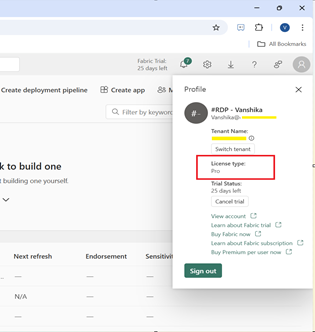
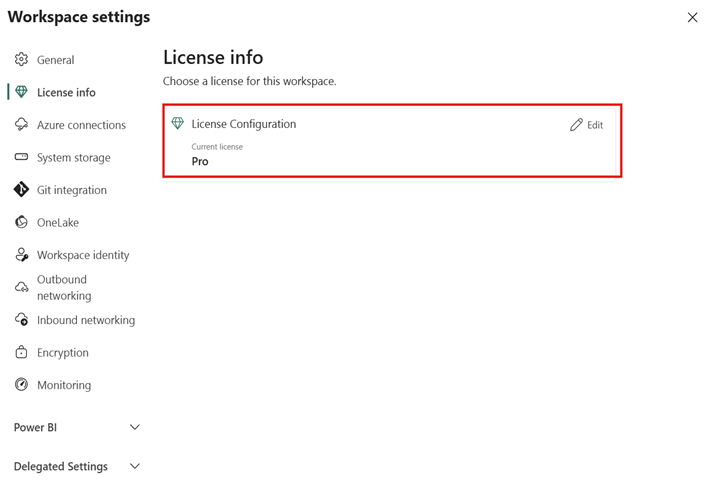
Here is screenshot of Pro license with the refresh limits:
Premium Per User (PPU) — The 48-Refresh Advantage
Premium Per User (PPU) offers a near-enterprise experience — delivering advanced performance and capabilities without requiring a fully dedicated Premium capacity. It’s a powerful middle ground between Pro and full Premium.
Key Highlights
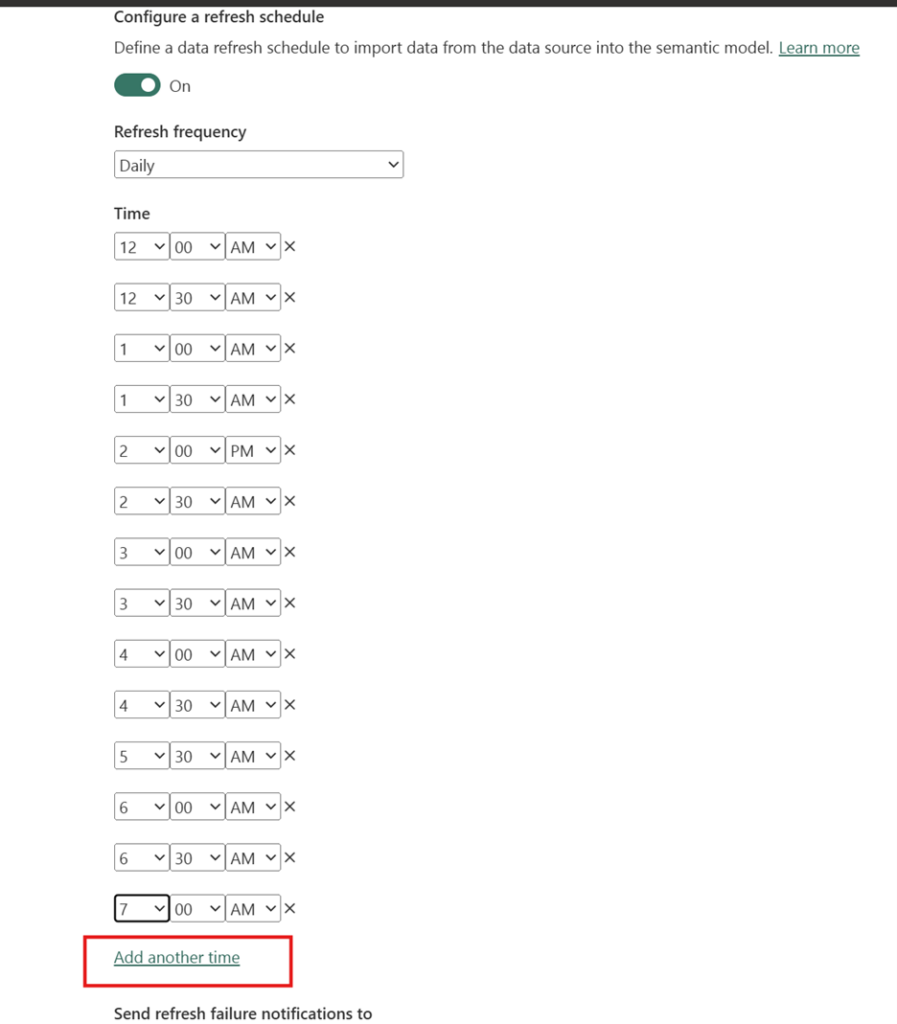
- Scheduled refreshes: Up to 48 times per day
- Model size limit: Up to 100 GB per dataset
- Capacity type: Microsoft-managed dedicated capacity
- Advanced features: Incremental refresh, XMLA endpoints, and support for larger models
Real-World Example
Imagine a retail analytics team tracking hourly sales performance across hundreds of stores. With Power BI Pro, they’d be limited to eight data refreshes per day — meaning their dashboard might lag real-time activity.
By switching to PPU, the team can schedule refreshes every 30 minutes, ensuring store managers always see up-to-date sales figures, inventory levels, and regional performance trends. This helps them react faster — adjusting promotions, reallocating stock, or managing staffing in near real time.
Best For
Teams that rely on up-to-the-minute KPIs and need consistent refresh performance, especially for dashboards tied to live operational or financial data.
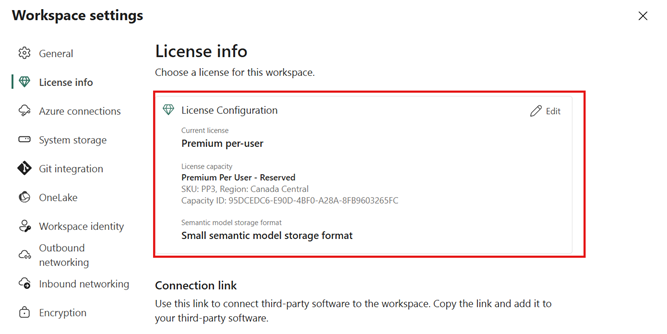
Here is screenshot of Premium per user license with the refresh limits:
Microsoft Fabric Capacity:
Microsoft Fabric provides multiple capacity tiers—F2, F4, F8, F16, and higher—each offering dedicated compute resources for Power BI and Fabric workloads. These capacities unlock Premium-level capabilities such as larger datasets, more frequent refreshes, better performance, and improved scalability.
A common question teams ask is:
“Do we need a large capacity for better refresh performance, or will a smaller one work?”
Surprisingly— 👉 Even the smallest Fabric capacity tier (F2) is sufficient for many Power BI scenarios.
Why F2 Capacity Is Often Preferable?
While Microsoft offers several capacity tiers (F2, F4, F8, etc.), F2 is the entry-level option, and that’s why it’s commonly used as a reference point.
Assigning a workspace to any Fabric capacity unlocks Premium performance—but F2 is the most affordable and commonly adopted starting tier.
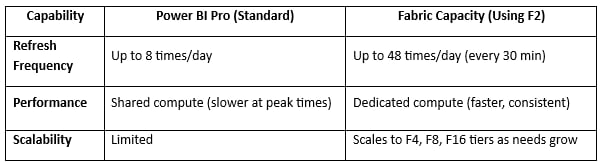
With a Fabric capacity (using F2), you get:
- Dedicated compute resources
- Faster and more consistent refresh performance
- Greater scalability than shared Pro environments
—all without paying for full Premium capacity.
Real-World Example
Consider a manufacturing company that monitors machine performance across multiple factories. With Power BI Pro, their dashboards can only refresh eight times daily — meaning equipment downtime or production delays might not be visible in real time.
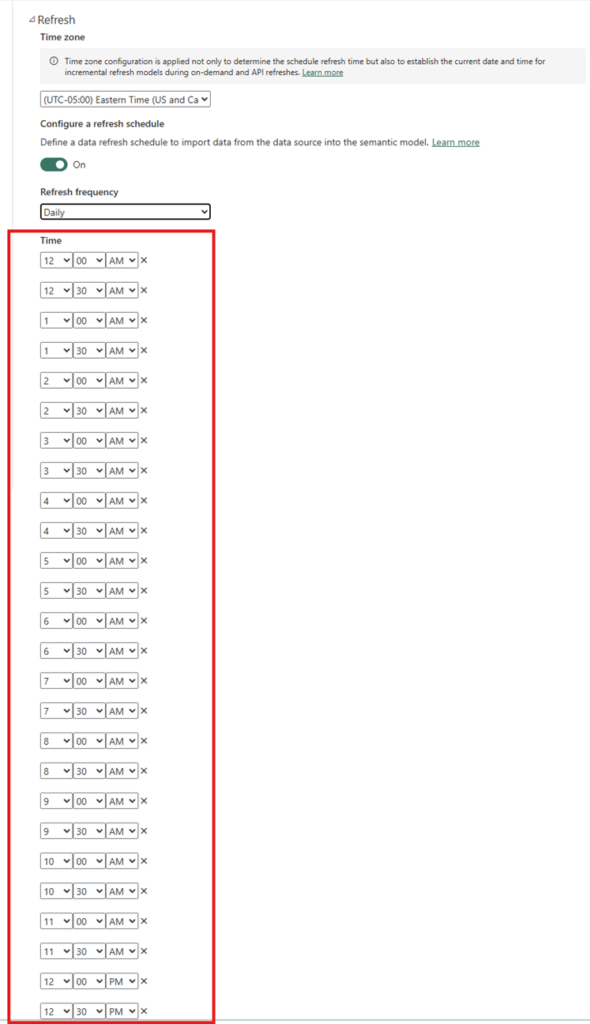
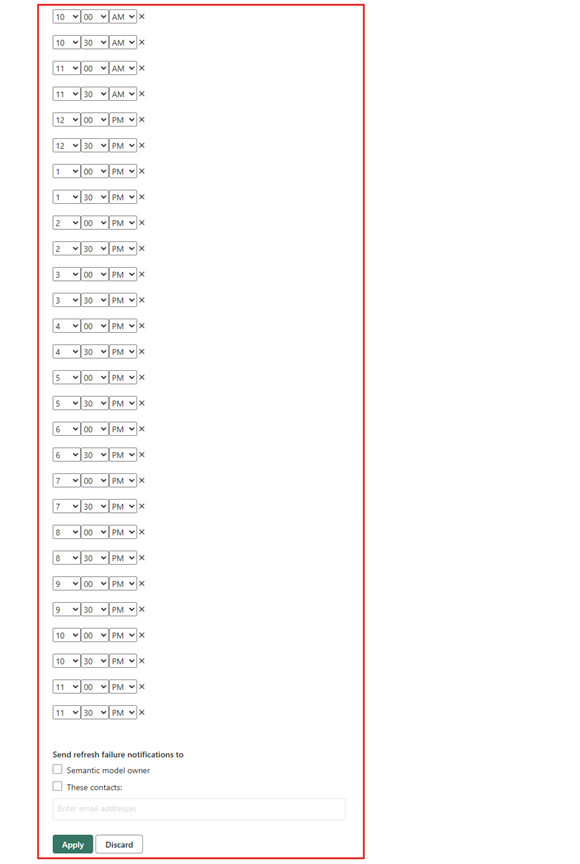
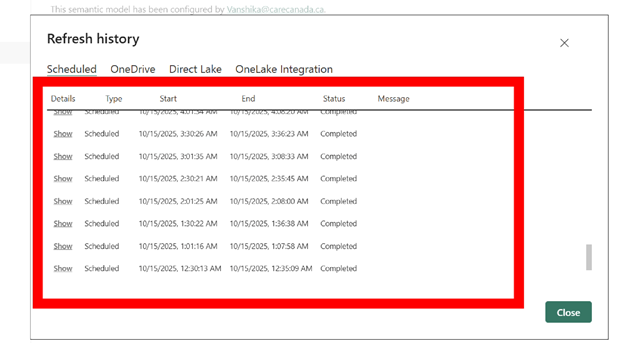
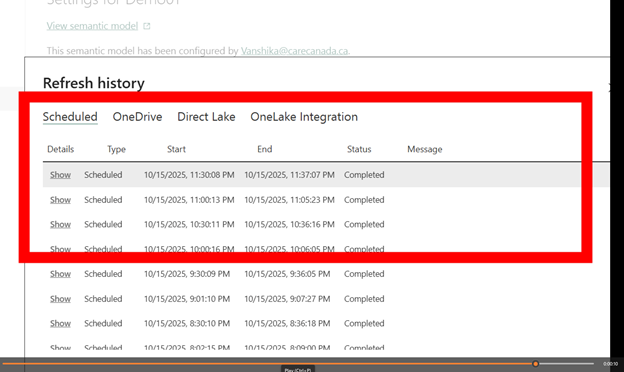
By switching their workspace to Fabric capacity (e.g. F2), they can refresh every 30 minutes (up to 48 times a day). This allows operations managers to spot anomalies instantly, prevent equipment failures, and optimize production schedules — saving both time and costs.
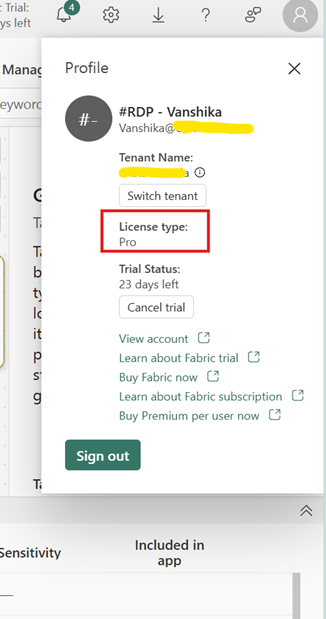
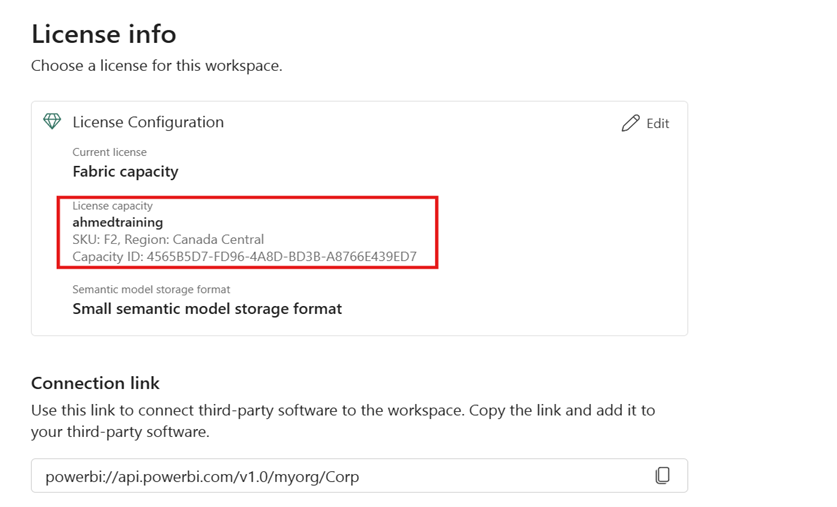
Here’s a screenshot showing the Pro license with F2 Fabric capacity on the workspace and its refresh limits.

Vanshika Vanshika
Vanshika Vanshika is a skilled Business Intelligence Analyst specializing in data visualization, predictive modeling, and machine learning. With expertise in tools like Power BI, Tableau, and Python, Vanshika has delivered impactful solutions across industries such as finance, healthcare, and retail. Her ability to translate complex data into actionable insights has supported strategic decision-making and operational efficiency. Vanshika's passion for innovation and her commitment to continuous learning make her an asset in leveraging data for business growth